TL;DR
- Most Salesforce consulting work happens inside mature, inherited orgs rather than net-new implementations. Discovery and relationship mapping are the foundation of every enhancement project because years of customizations, stakeholder changes, and cross-cloud dependencies rarely exist in documentation alone.
- Salesforce's native Buyer Relationship Map and Einstein Activity Capture are built for sales reps on individual deals, not for SI partners who need org-level metadata, account hierarchies, and cross-cloud dependencies mapped before requirements begin.
- Systematizing relationship mapping drives four times faster onboarding and cuts discovery rework for delivery teams.
- Manual mapping across five to 10 concurrent implementations using spreadsheets, Visio, and Miro does not scale: inconsistencies between consultants compound into design gaps and deployment failures.
- HighRev.ai's multi-agent platform generates metadata-level relationship maps as a byproduct of automated org discovery, surfacing object relationships, sharing rules, Contact Roles, and cross-cloud dependencies before workshops begin.
Every Salesforce consulting partner has faced this situation: three sprints into a Service Cloud implementation, you discover the VP responsible for the approval workflow was never included in the mapping, interviews, or requirements sessions.
This misalignment leads to significant rework involving the object model, sharing rules, and automation logic already developed. The challenge is even greater because most consulting engagements involve enhancing mature, inherited Salesforce orgs rather than building greenfield implementations. Years of customizations, stakeholder changes, and undocumented business processes mean that discovery and relationship mapping become the foundation of every successful enhancement project.
While relationship mapping in Salesforce aims to prevent such issues, most guides focus on sales enablement, making them inadequate for consulting partners that need a comprehensive understanding of both a client's organizational structure and metadata landscape before design begins.
This guide covers how Salesforce relationship mapping actually works for delivery teams: native features and their limitations, stakeholder frameworks that connect to data model decisions, the metadata-level mapping that manual approaches miss, and how AI-powered discovery is changing what is possible. It is written from the perspective of a team that built HighRev.ai specifically to automate these delivery workflows for consulting partners managing complex, multi-org environments.
What Is Salesforce Relationship Mapping and Why Does It Matter for Delivery?
Relationship mapping in Salesforce is more than drawing lines between contacts on an org chart. For delivery teams, it means understanding how entities in a client's org relate at two levels: the human layer (who influences what, who owns which process, who signs off on design) and the metadata layer (how objects connect, how sharing rules propagate access, how role hierarchies govern visibility).
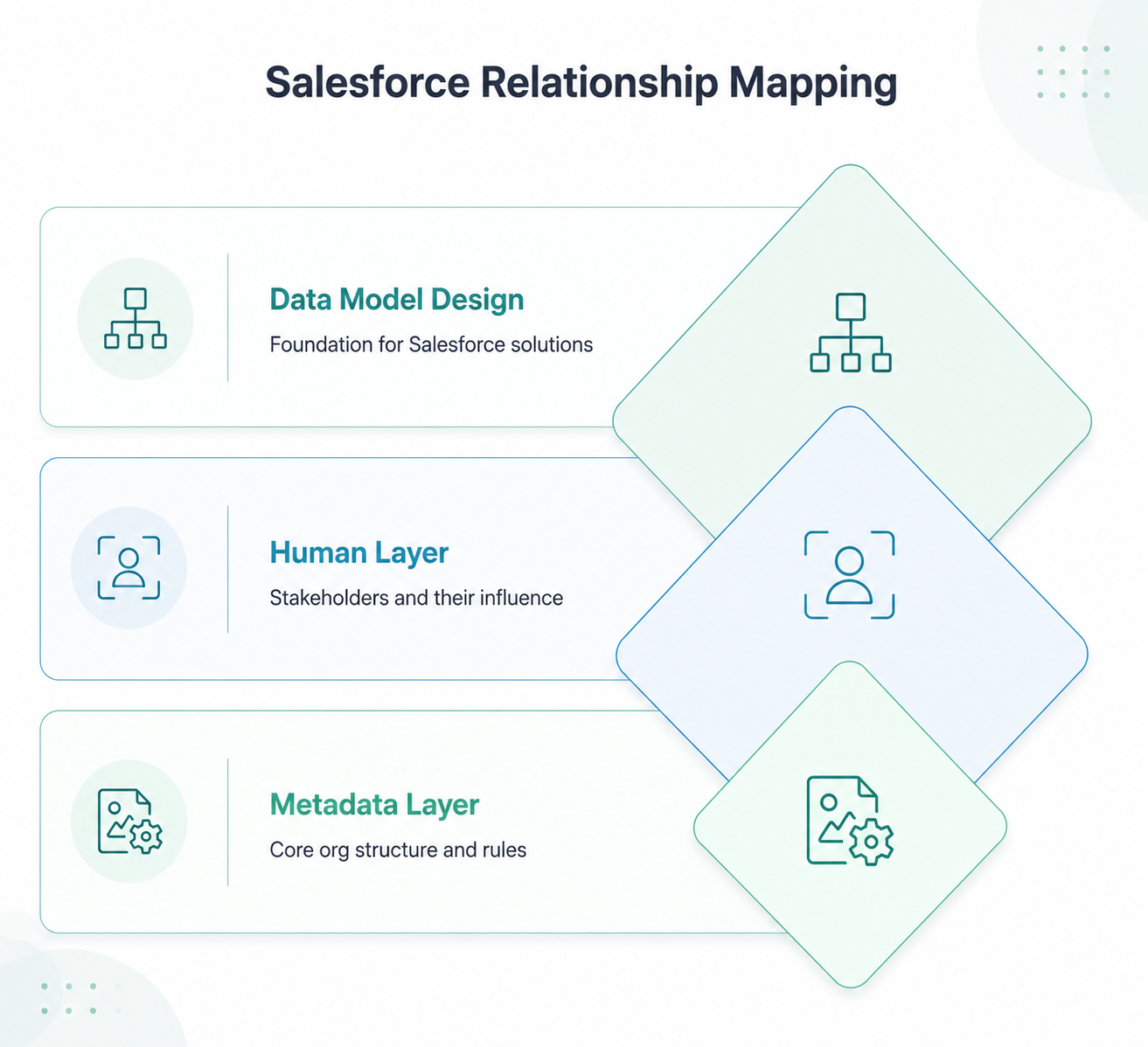
At the human layer, a Salesforce relationship map identifies decision makers, process owners, system champions, and detractors whose views shape requirements. It shows who owns which business processes and how their influence drives prioritization, including which Salesforce objects they use, which automation controls their workflows, and which requirements they will defend even against architectural best practices.
At the metadata layer, the relationship map shows how objects, fields, flows, and sharing rules in a client's org are connected. An Account hierarchy configured five years ago shapes every new feature that touches accounts, a poorly designed role hierarchy creates record visibility gaps, and a Contact Role setup for one cloud can conflict when you add another. These relationships matter as much as the human ones and require reading the org directly, not interviewing stakeholders.
For consulting partners, both layers feed directly into the data model design. The sharing rules you recommend, the role hierarchy you design, and the object relationships you propose must be grounded in an accurate picture of how the org works and who owns which processes; get either layer wrong in discovery, and you pay for it in build.
Native Salesforce Relationship Mapping Features You Should Know
Salesforce's built-in relationship mapping tools are well-designed for what they were built to do: help sales reps manage stakeholder relationships within individual deals and accounts. Understanding what each feature does, and where it stops, is the starting point for knowing what consulting partners need to add on top.
Buyer Relationship Map on opportunities
The Buyer Relationship Map, available on Opportunity records, visualizes the stakeholders connected to a deal: their roles, influence levels, and relationships with one another. It pulls from Contact Roles associated with the Opportunity and lets reps score stakeholder support on a low-to-high advocacy scale. For a sales team managing a complex enterprise deal with 10 to 15 stakeholders, this is genuinely useful. For an implementation team that needs to understand 50 to 100 people across multiple business units, it does not cover the scope.
Automated Contact Enhancement and Einstein Activity Capture
Einstein Activity Capture monitors email and calendar interactions and, based on an admin‑defined threshold of up to three mentions in email or event activity, can suggest or automatically create related contacts in Salesforce. This keeps contact data current without requiring manual data entry, but it also means stakeholders who are critical to an implementation yet not active in project email threads can be missed, especially people in IT, legal, or change management whose influence is more design focused than commercial.
View Relationship Map on accounts
The Account-level Relationship Map provides a visual representation of contacts within an account and their connections to each other. It shows reporting relationships, team structures, and who is connected to whom. For a discovery team trying to understand a large enterprise client's organizational structure before workshops begin, this gives useful context on the human layer. It does not read metadata. It does not surface object relationships, sharing rule configurations, or cross-cloud dependencies.
Pipeline Inspection integration
Pipeline Inspection surfaces deal health signals alongside relationship data, helping sales teams identify at-risk opportunities. This is relevant for the client's sales team post-implementation, not for the implementation team during delivery. It is worth understanding because clients will sometimes ask for it during requirements gathering, and knowing where it fits in the native feature set helps scope those conversations accurately.
The pattern across all four native features is consistent: they are designed for sales rep workflows, operating on individual deals and accounts. They do not address the org-level metadata relationships that determine whether a proposed data model is feasible, whether a sharing rule will work as designed, or whether a Contact Role configuration will create conflicts across cloud environments.
Stakeholder Categorization: Building the Map That Actually Drives Decisions
Standard stakeholder categorization provides a framework for organizing the human layer of your relationship map: decision makers, influencers, budget holders, process owners, end users, champions, and detractors, scored on a 1 to 5 influence scale, with low, medium, or high advocacy grading. Where most implementations fail is in treating this as a standalone artifact rather than an input to a data model design.
Decision makers are stakeholders whose approval is required for design sign-off, typically the CRO and VP of Revenue Operations in a Revenue Cloud Advanced engagement. Influencers shape decisions without formal authority: a senior sales manager whose team uses CPQ daily, or an architect who will maintain the org post-delivery. Budget holders matter less for design but become critical when scope changes arrive.
Process owners are the most frequently undercounted category. They may not appear on the org chart or attend steering meetings, but their unmet requirements trigger late-breaking scope changes. Mapping process owners to Salesforce objects (Account, Opportunity, Service Case) turns stakeholder mapping from a people exercise into a delivery input.
Map champions and detractors with equal rigour. A champion accelerates adoption; a detractor who owns a process your design does not accommodate is a rework risk at UAT. Relationship mapping that targets 100% account health transparency surfaces both categories early enough to act on; in most implementations, they surface too late.
Use influence scores to prioritize workshop sequencing. A high-influence, low-advocacy stakeholder is your highest-priority interview: their objections surfaced in discovery are manageable; surfaced in UAT, they are expensive.
The Manual Mapping Problem: Why Spreadsheets and Native Tools Break at Scale
A consulting partner managing five to 10 concurrent implementations runs five to 10 parallel mapping exercises simultaneously, each requiring its own discovery effort, documentation format, and consultant time. The overhead is not additive: inconsistencies between how different consultants document the same relationships compound into design gaps that become deployment failures.
In practice, a senior consultant spends two to three days reviewing Contact Roles, Account hierarchies, and sharing rule configurations. A BA documents stakeholder interviews in Excel. Someone builds a Visio or Miro diagram. By the design phase, three documents describe the same org from three angles, and nobody has time to reconcile them.
The costs of Salesforce implementation compound with every undiscovered relationship. A missed Contact Role configuration creates a sharing model conflict in build. A partially documented Account hierarchy breaks record visibility for an entire business unit. These are not edge cases: they are the predictable output of a discovery process that depends on consultant memory and orgs that change between phases.
Published UX and stakeholder‑mapping research shows that centralizing relationship information improves onboarding clarity and reduces time spent rediscovering ‘who owns what’ across projects. Native Salesforce tools do not solve this at the partner operations level; they solve it for individual reps on individual deals. What partners need is an approach that reads the org directly, produces consistent structured output, and does not require three days of senior consultant time before discovery workshops can begin.
Also read: How AI-Powered Salesforce Discovery Helps Teams Plan CRM Implementations Faster
How AI-Powered Discovery Changes Salesforce Relationship Mapping
Salesforce relationship mapping has traditionally served one purpose: helping sales teams understand who knows whom. But for implementation teams, the stakes are different. A missed object dependency or misconfigured sharing rule doesn't just slow a deal. What it does is break a deployment. That shift in purpose demands a fundamentally different approach to how relationships are mapped in the first place.
Manual relationship mapping depends on what people know and report. An automated org audit reads what is actually in the org: every object relationship, sharing rule, Contact Role configuration, field dependency, and installed package. The map it produces reflects how the org works, not how stakeholders describe it.
When an AI agent ingests org metadata, it traverses the full object graph: standard and custom objects, master-detail, lookup, and junction relationships, the fields that define them, and the automation logic that fires when they change. It maps sharing rules to the objects they govern, identifies role-hierarchy nodes that create visibility gaps, and surfaces contact-role configurations that may conflict with new cloud additions.
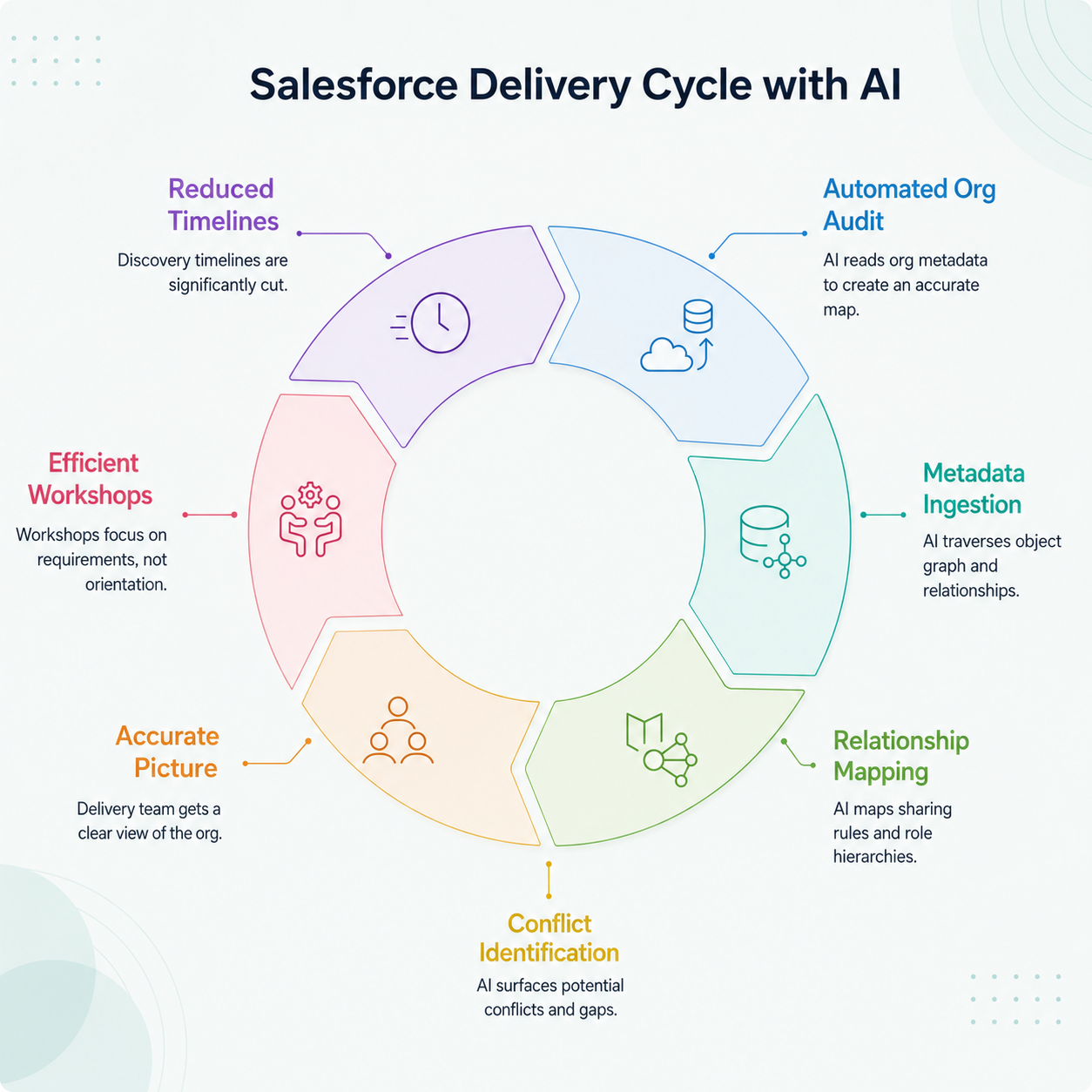
For a Revenue Cloud Advanced engagement, this means the delivery team inherits an accurate picture of how Accounts, Contacts, Opportunities, Products, Price Books, and Quotes are configured in the actual org, not the generic data model from documentation, but the specific configuration accumulated over the org's history. Orphaned contacts, broken Account hierarchies, and Contact Role configurations referencing missing record types all surface before a single requirements workshop is scheduled.
The delivery impact is direct: workshops start with a shared, accurate picture of the current state, so stakeholder interviews cover requirements and priorities rather than org orientation. Consulting partners using automated org audits report cutting discovery timelines by weeks, not days.
This is where HighRev.ai's multi-agent AI platform differs from native tools and third-party mapping apps.
Purpose-built for consulting partners managing multi-org environments, HighRev.ai’s Org Intelligence Agent connects via OAuth and generates a structured documentation layer covering data models, object dependencies, sharing rules, role hierarchy, Contact Role setups, and cross-cloud dependencies: context that every subsequent delivery agent draws on when generating user stories, solution designs, and deployment-ready code.
The result is a metadata-grounded relationship map ready before the first requirements workshop, across every org in a partner's portfolio.
To see how AI-powered org discovery generates relationship maps across a live Salesforce org:
⇒ Schedule a Demo with HighRev.ai
Relationship Mapping Across Multi-Org and Multi-Cloud Environments
Single-org relationship mapping is relatively tractable. The complexity multiplies when a consulting partner manages implementations across multiple client orgs simultaneously, or when a single client's implementation spans Sales Cloud, Service Cloud, and Revenue Cloud Advanced. Contact and Account relationships may be configured differently across clouds. Sharing rules may conflict. Sandbox and production relationship structures regularly diverge as manual changes accumulate outside the deployment pipeline.
Practical Steps to Implement Relationship Mapping in Your Delivery Workflow
Relationship mapping is most valuable when it is a standard part of your delivery process, not an artifact produced once at project kickoff and filed in a shared drive. The five steps below give you a framework for making it systematic: starting before workshops, running through every phase gate, and ending with a relationship map that developers inherit as part of their working context.
Step 1: Run an automated org audit before any manual stakeholder interviews
Before scheduling your first discovery workshop, connect to the client's production org and run an automated audit. The output provides your team with a factual baseline: the object model, sharing rules, role hierarchy, Contact Role configurations, and integration footprints. Stakeholder interviews then focus on requirements and priorities, not reconstructing a current-state picture that the org itself can provide in hours.
Step 2: Map metadata relationships first, then overlay human stakeholder roles
Once the audit is complete, map the metadata layer first: which objects relate to which, how sharing rules propagate, and where the role hierarchy creates visibility boundaries. Then overlay the human layer: which business unit owns which object and which process owner's requirements affect which part of the data model. This sequence matters because the metadata layer constrains what the human layer can request: a sharing model question is not purely a stakeholder question.
Step 3: Use influence scoring to prioritize which relationships affect design decisions
Apply the 1 to 5 influence scale to identify stakeholders whose requirements will shape design decisions, and grade their advocacy (low, medium, high) to locate where design risks concentrate. Interview high‑influence, low‑advocacy stakeholders first, because if you uncover their concerns during discovery, you can avoid costly rework.
Step 4: Integrate the relationship map into design documentation so developers inherit context
A relationship map filed in a separate discovery artifact gets ignored during build. Integrate it directly into design documentation: reference the metadata map when specifying object relationships, cite stakeholder ownership when documenting sharing rule decisions, and link influence scores to backlog prioritization. When a developer picks up a user story, the relevant stakeholder, objects, and sharing constraints should already be visible.
Step 5: Refresh the map at each project phase gate
Stakeholders shift, metadata changes, and parallel projects introduce new dependencies between discovery and UAT. Refresh the map at each gate: discovery to design, design to build, and build to UAT. A delta audit covering changes since the last review is sufficient; what matters is that the map stays current, not that it becomes a snapshot of the org as it was at kickoff.
What Consulting Partners Get Wrong About Relationship Mapping
Most consulting teams handle the human layer well: stakeholder interviews, influence scoring, and decision maker tracking. Very few apply the same rigour to the metadata layer. Object relationships, sharing rules, role hierarchy configurations, and Contact Role setups get reviewed once in discovery and then treated as static background rather than live constraints on every design decision.
The result is design decisions that look correct in isolation but conflict with the metadata they operate in. A sharing rule that ignores the existing role hierarchy creates visibility gaps in records. An object relationship that misses a managed package namespace collision creates a deployment failure. Apply the same structure and update cadence to the metadata layer that you apply to the human layer.
The Buyer Relationship Map, Einstein Activity Capture, and the Account-level Relationship Map are useful for what they were designed to do: helping sales reps manage stakeholder relationships on individual deals. They were not built to give a consulting team a metadata-level org picture before implementation begins. Using them as the primary delivery mapping tool is like using a customer-facing dashboard to audit a database.
Use native features in their intended context, as part of the post-implementation CRM experience you are building for your client. For delivery itself, use an approach that reads org metadata directly, produces consistent structured output, and scales across concurrent engagements. Automated org discovery does exactly that, and generates the relationship map as a byproduct.
To see how AI-powered org discovery generates metadata-level relationship maps across live Salesforce orgs:
⇒ Schedule a Demo with HighRev.ai
Or explore more Salesforce delivery insights on our blog.
Frequently Asked Questions
1. How does Salesforce's native Buyer Relationship Map differ from third-party relationship mapping tools?
Salesforce's Buyer Relationship Map aids sales reps with individual opportunities, while third-party tools offer broader mapping and stakeholder tracking. However, they fall short for consulting partners needing detailed metadata-level relationship mapping read directly from the org's configuration.
2. Can relationship mapping be automated across multiple Salesforce orgs simultaneously?
Yes, with a platform that connects to multiple orgs via the Salesforce Metadata API and processes them in parallel. Unlike manual relationship mapping, which is sequential and varies by consultant, automated org discovery reads metadata directly. It creates consistent relationship maps that include object dependencies, sharing rules, role hierarchies, and Contact Roles across all orgs, regardless of the number of active engagements.
3. What metadata should be included in a Salesforce relationship map beyond Contacts and Accounts?
A metadata-level relationship map for delivery should cover object relationships (standard, custom, and junction), sharing rules, role hierarchy boundaries, Contact Role record types, installed package namespaces, and key field dependencies. For multi-cloud implementations, it should also map cross-cloud dependencies, such as how CPQ, Sales Cloud, Service Cloud, and Revenue Cloud objects reference the same Accounts, Contacts, and sharing structures.
4. How often should a relationship map be updated during a Salesforce implementation lifecycle?
Refresh the relationship map at each major phase gate: end of discovery, end of design, and start of UAT. Because orgs change between gates (admin activity, package upgrades, parallel projects), a delta audit at each gate is more efficient than a full re-audit while still catching changes that affect current design and build decisions.
5. What is the impact of incomplete relationship mapping on Salesforce deployment timelines?
Incomplete relationship mapping shows up as rework at the most expensive point in the delivery process: build and UAT. A single sharing rule or Contact Role conflict at that stage can trigger redesign, reconfiguration, and data fixes, because every relationship missed in discovery is a potential defect in build.




