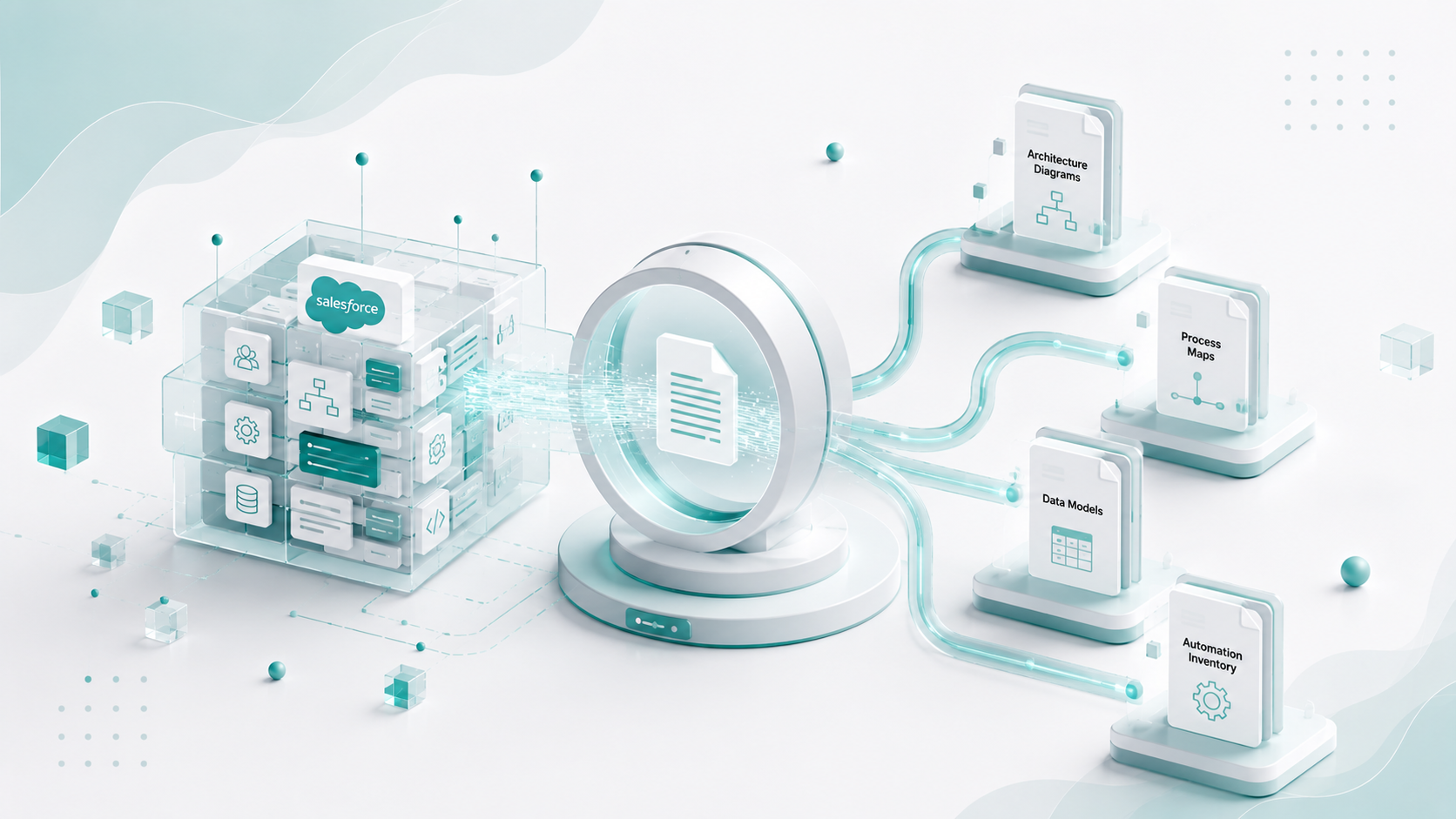
Salesforce documentation becomes difficult to maintain because Salesforce environments change constantly. New fields are added, automations evolve, integrations are introduced, and different teams make updates over time. As the system grows, documentation often struggles to keep pace with the actual CRM configuration.
In fact, in a discussion on the Salesforce community forum on Reddit, a user described how their team invested time creating documentation, only to find that no one used it and that within six months the documentation no longer reflected the system. Other participants in the thread raised a similar concern: how do teams actually keep Salesforce documentation up to date as processes evolve?
These responses prove a common reality. Salesforce documentation is not a one-time artifact created during implementation. It is a living system that must evolve as the CRM changes. As new automations, integrations, and configurations are introduced, documentation must be updated continuously to remain useful.
For Salesforce admins, consulting and implementation partners, this creates a recurring challenge. Most projects begin with an existing client environment where documentation is incomplete or outdated. Before teams can deliver new functionality, they must first understand what already exists.
This article explores why Salesforce documentation breaks as environments grow, where traditional documentation approaches fall short, and how Salesforce document automation helps consulting partners understand client orgs faster and deliver projects with confidence.
Why Does Salesforce Documentation Break at Scale
Salesforce environments change continuously. New fields are added, flows and automations are introduced, and integrations connect external systems to the CRM. Each change adds new layers of configuration that documentation must capture.
As the system evolves, documentation often struggles to keep pace with these changes. Over time, this makes it increasingly difficult for teams to maintain accurate and reliable documentation of the CRM.
Here are the key factors why Salesforce documentation fails at scale:
Undocumented customizations
Many Salesforce environments accumulate custom objects, fields, flows, and Apex logic over time. These changes are implemented to solve immediate business needs but are not always documented. As the number of customizations grows, it becomes harder for teams to understand how the CRM actually works.
In many implementations, developers introduce small or incremental changes during ongoing work. Documenting these changes is often delayed or deprioritized because teams focus on delivering functionality first. Minor updates such as new fields, validation rules, or automation tweaks are sometimes pushed to a documentation backlog with the intention of updating everything later.
Over time, this backlog grows and documentation quickly becomes outdated because it no longer reflects the many small changes introduced across the system.
Hidden dependencies across automations
Salesforce automations rarely operate in isolation. A single business process may involve flows, validation rules, triggers, and integrations. These components often depend on each other in ways that are difficult to detect through manual inspection.
Without clear documentation, teams may overlook dependencies when making changes. A modification to one automation can unintentionally affect other processes that rely on the same objects, fields, or triggers.
Technical debt accumulation
Over time, multiple implementations, quick fixes, and evolving business requirements introduce technical debt. McKinsey reports CIOs estimate technical debt represents 20-40% of total technology estate value, with 10-20% of new product budgets diverted to remediation. Legacy automations remain active long after the original business process has changed.
As new configurations are added without removing outdated ones, the system becomes harder to interpret. Teams may encounter flows, triggers, or validation rules that still run in production but no longer have clear documentation explaining their purpose.
Inherited brownfield environments
Many Salesforce projects begin with an existing org rather than a clean implementation. Consulting partners frequently inherit environments that have evolved over several years.
Documentation in these environments is incomplete or difficult to understand. Before introducing new functionality, teams must manually analyze objects, automation logic, and integrations to understand how the system currently operates.
Multiple custodians over time
Salesforce environments are rarely managed by a single team throughout their lifecycle. Different admins, developers, and consulting partners may maintain the org across multiple phases of growth.
As teams change, institutional knowledge about system architecture gradually disappears. Even when documentation exists, it may reflect earlier implementations rather than the current system state.
Because of these factors, documentation quickly becomes outdated. When consulting partners enter a new Salesforce environment, understanding the system often requires extensive manual discovery across objects, automations, and integrations.
What Does Salesforce Document Automation Actually Mean
Salesforce document automation is used broadly across the ecosystem, but it typically refers to two different capabilities.
Business Document Generation
Business Requirements Documents (BRDs) are typically created by Business Analysts for a specific project. They capture business pain points, current challenges, and future state expectations, translating stakeholder inputs into structured requirements that guide implementation.
Business process documents are usually maintained by business stakeholders on the client side. They describe how sales, marketing, or support processes operate within Salesforce at a given point in time, reflecting the live, configured state of the system.
In this context, document automation can apply to the creation and maintenance of these structured artifacts. While they do not trigger operational actions like quotes or contracts, they play a critical role in aligning business intent with system implementation and ensuring continuity across project stages.
In some Salesforce implementations, document automation refers to automating the creation and maintenance of business requirements documentation (BRDs).
BRDs are used to capture implementation details, document the rationale behind design decisions, and describe how Salesforce processes are expected to work. Unlike operational documents, BRDs do not generate actions such as quotes or contracts. Instead, they serve as structured documentation that guides system implementation.
Automation in this context focuses on streamlining how information is captured and maintained within the document.
Examples include:
- Automatically populating requirement details from project inputs or system configurations
- Tracking updates to business requirements and documenting change history
- Pulling implementation notes, workflows, or process descriptions into documentation templates
These workflows help ensure that requirements documentation stays structured and up to date as projects evolve.
In this category, document automation focuses on maintaining and updating project documentation, rather than generating operational documents from CRM data.
Technical CRM Documentation
The second category focuses on documenting the Salesforce system itself.
Instead of generating customer documents, these tools analyze Salesforce metadata to create structured documentation of the CRM architecture. This may include:
- Objects, fields, and data model relationships
- Automation mapping for flows, triggers, and validation rules
- Dependency visibility across components
- Integration documentation for connected systems
This form of automation helps teams understand how a Salesforce environment is structured and how its components interact.
The rest of this article focuses on this second category. This includes AI automated documentation that helps teams understand Salesforce architecture, metadata, and dependencies more efficiently.
The Gaps in Current Salesforce Documentation Solutions
Several tools attempt to address Salesforce documentation challenges, but most fall into three broad categories. Each category solves a narrow part of the problem while leaving important gaps in the discovery and delivery workflow.
Documentation-only tools
Some tools focus majorly on exporting Salesforce metadata and converting it into documentation or diagrams. They typically extract objects, fields, relationships, and automation components from Salesforce and present them as visual diagrams or structured documentation.
These tools are useful for generating architecture overviews or data model diagrams. However, they generally stop at static documentation.
They do not help teams interpret how the system supports real business processes, identify requirements for new implementations, or translate documentation into delivery workflows. As a result, consulting teams still need to perform manual analysis to understand how the CRM actually operates.
Generic AI tools
Another category includes general-purpose AI assistants such as ChatGPT or GitHub Copilot.
These tools can help generate code snippets, documentation summaries, or technical explanations. However, they operate without direct visibility into a Salesforce org.
Since they cannot analyze metadata relationships, object dependencies, or automation structures inside Salesforce, they lack the system context needed to document architecture accurately or support discovery in real environments.
This limits their usefulness for understanding inherited orgs or mapping existing automations.
Developer-focused tools
The third category includes developer productivity tools to accelerate coding. These tools help engineers write Apex classes, generate tests, or streamline development workflows within the Salesforce ecosystem.
While valuable for engineering teams’ productivity, they focus on building new functionality, not on understanding existing environments.
They do little to support discovery, requirements analysis, or architecture documentation. For consulting teams entering a complex, legacy or inherited Salesforce org, the core challenge is understanding the current system before making changes, something these tools typically do not address.
The Time Cost of Manual Salesforce Documentation
When documentation is incomplete or outdated, developers and architects have to reconstruct it manually before making changes. This typically involves reviewing objects, fields, flows, triggers, validation rules, and integrations across the org to understand how processes actually work.
The process is time-intensive. Developers frequently export metadata, trace automation logic, and map dependencies across components to rebuild documentation that no longer reflects the current system.
In large Salesforce environments with hundreds or thousands of components, manually documenting architecture, automations, and integrations can take days or even weeks of investigation before development work can safely begin.
This time overhead is one of the key reasons teams are exploring automated approaches to generate Salesforce documentation directly from metadata.
How Does AI Enable Intelligent Salesforce Documentation
AI-driven documentation tools analyze Salesforce metadata, configuration layers, and custom code to automatically generate structured documentation of the system.
Instead of manually reviewing setup menus, objects, and automation logic, AI can process the metadata layer of Salesforce to document how the environment is actually built.
This includes identifying object relationships, Apex dependencies, Flow logic, and automation paths across the org.
Dependency detection
A key capability of AI-enabled Intelligent Salesforce Documentation is dependency detection. AI can map how fields, objects, triggers, validation rules, flows, and integrations interact with each other. In large environments, these dependencies are difficult to trace manually. Automated dependency mapping helps teams understand how components are connected across the system.
Impact analysis
Building on dependency mapping, AI can also provide impact analysis before changes are made. This is especially critical in brownfield environments where partners are working on change requests or enhancements.
AI can identify what components will be affected by a proposed change, what may break, and where downstream risks exist. It can also suggest how to mitigate those risks, allowing teams to make informed decisions before development begins rather than reacting to issues later in QA or production.
Automation maps
AI can also generate automation maps that document how business processes run across the platform. By analyzing tools such as Salesforce Flow and custom Apex logic, documentation tools can reconstruct the sequence of automation steps that drive sales, service, or operational workflows.
Integration visibility
Another important capability of AI-enabled Salesforce documentation is integration visibility. Enterprise Salesforce environments frequently connect to external systems such as marketing platforms, data warehouses, billing systems, and middleware.
AI-driven documentation can identify APIs, data flows, and connected systems, helping teams understand how Salesforce interacts with the broader technology ecosystem.
Since Salesforce environments change continuously, AI-based documentation can also update dynamically as metadata evolves. This helps prevent documentation from becoming outdated after releases, new integrations, or automation changes.
For Salesforce admins and enterprise teams working in complex or inherited environments, AI-enabled documentation provides a scalable way to understand architecture, dependencies, integrations, and potential change impact without relying on manual discovery across the org.
Who Benefits from Salesforce Document Automation
Automated Salesforce documentation improves visibility into CRM architecture, making it easier for teams to understand how objects, automations, and integrations interact.
Business Impact for Salesforce Consulting Partners
When Salesforce documentation is incomplete or outdated, consulting Salesforce teams spend a considerable portion of project time reconstructing the system before they can safely introduce new changes. Automated documentation directly impacts several parts of the delivery lifecycle.
Faster discovery
The first phase of many Salesforce engagements involves understanding the existing environment. Teams need visibility into objects, fields, automations, integrations, and dependencies before planning new work.
When documentation must be created manually, discovery can take days or weeks. Automated documentation tools analyze metadata and generate structured documentation much faster, allowing teams to understand inherited Salesforce environments in hours rather than extended investigation cycles.
Reduced rework
Many delivery issues occur when hidden dependencies are discovered late in the project.
If flows, triggers, validation rules, or integrations are not clearly documented, changes in one part of the system can unintentionally impact other processes. Automated documentation helps surface these dependencies earlier, allowing teams to anticipate risks before development begins.
Better delivery predictability
Reliable documentation improves project planning.
When teams understand the current architecture, automation layers, and integration landscape, it becomes easier to estimate effort, define scope, and avoid unexpected technical constraints. This leads to more predictable delivery timelines and fewer mid-project surprises.
Margin protection
Manual discovery work consumes billable engineering teams’ time but does not directly advance project deliverables.
When architects and developers spend days reconstructing Salesforce documentation, project margins can shrink quickly. Automating documentation reduces the time spent on investigation and improves delivery efficiency, helping organizations protect gross margins while scaling projects across multiple client environments.
How Intelligent Documentation Helps Salesforce Clients
While implementation partners benefit from delivery acceleration, Salesforce clients are increasingly adopting intelligent documentation for visibility, control, and governance across their own environments.
In many enterprises, Salesforce is not a single org but a landscape of multiple instances, business units, and integrations. Over time, this creates fragmentation where no single team has a reliable, up-to-date understanding of how the system actually works.
AI-enabled documentation addresses this by acting as a live, system-aware documentation and intelligence layer on top of Salesforce.
Live, system-aware visibility
Continuously analyzes Salesforce metadata to provide an accurate, up-to-date view of objects, automation, dependencies, and integrations, without relying on static documentation.
A “clickable Confluence” for Salesforce
Acts as a live, interactive documentation layer. Instead of maintaining separate documents, teams can explore their Salesforce org through structured, connected views that stay in sync with the system.
Stronger change governance with impact analysis
Before making changes, teams can understand what will be impacted, what could break, and how components are connected. This is especially critical for enterprises managing multiple orgs or complex account structures.
Control across multiple orgs and teams
For organizations with multiple Salesforce instances or distributed teams, this creates a unified view of the system, reducing fragmentation and improving coordination.
Reduced dependency on vendors
Clients gain direct visibility into their own systems, reducing reliance on partners for basic system understanding and enabling more informed decision-making.
For Salesforce clients, this becomes a control and intelligence layer. This helps them understand what exists, how it is connected, and what the impact of change will be in real time.
HighRev.ai: Intelligent Salesforce Document Automation and Delivery Platform
Most documentation tools treat Salesforce documentation as a static artifact created after implementation. HighRev.ai approaches the problem differently.
HighRev.ai treats Salesforce documentation as the foundation of the entire delivery lifecycle, enabling teams to understand CRM architecture before discovery, design, or development begins.
Automated Salesforce Discovery and CRM Documentation
When a Salesforce org is connected, HighRev.ai automatically analyzes metadata and generates structured documentation of the environment.
One of HighRev.ai’s Salesforce SI partners said, “HighRev.ai's agents remarkably accelerated our discovery process. We now use it as a centralized hub for managing technical documentation across all client instances.”
The platform documents key components across the CRM, including:
- Objects and fields
- Field fill rates and data usage insights
- Validation rules
- Flows and triggers
- Apex classes
- Integrations and installed packages
- Data model relationships
- Permission sets, org configuration, and security controls
Instead of manually compiling documentation, teams receive a navigable CRM knowledge base generated directly from Salesforce metadata. This documentation environment functions similarly to tools like Confluence, but is automatically created and continuously updated based on the actual Salesforce org.
By transforming metadata into structured documentation, HighRev.ai enables teams to quickly understand CRM architecture, automation logic, and dependencies before beginning implementation work.
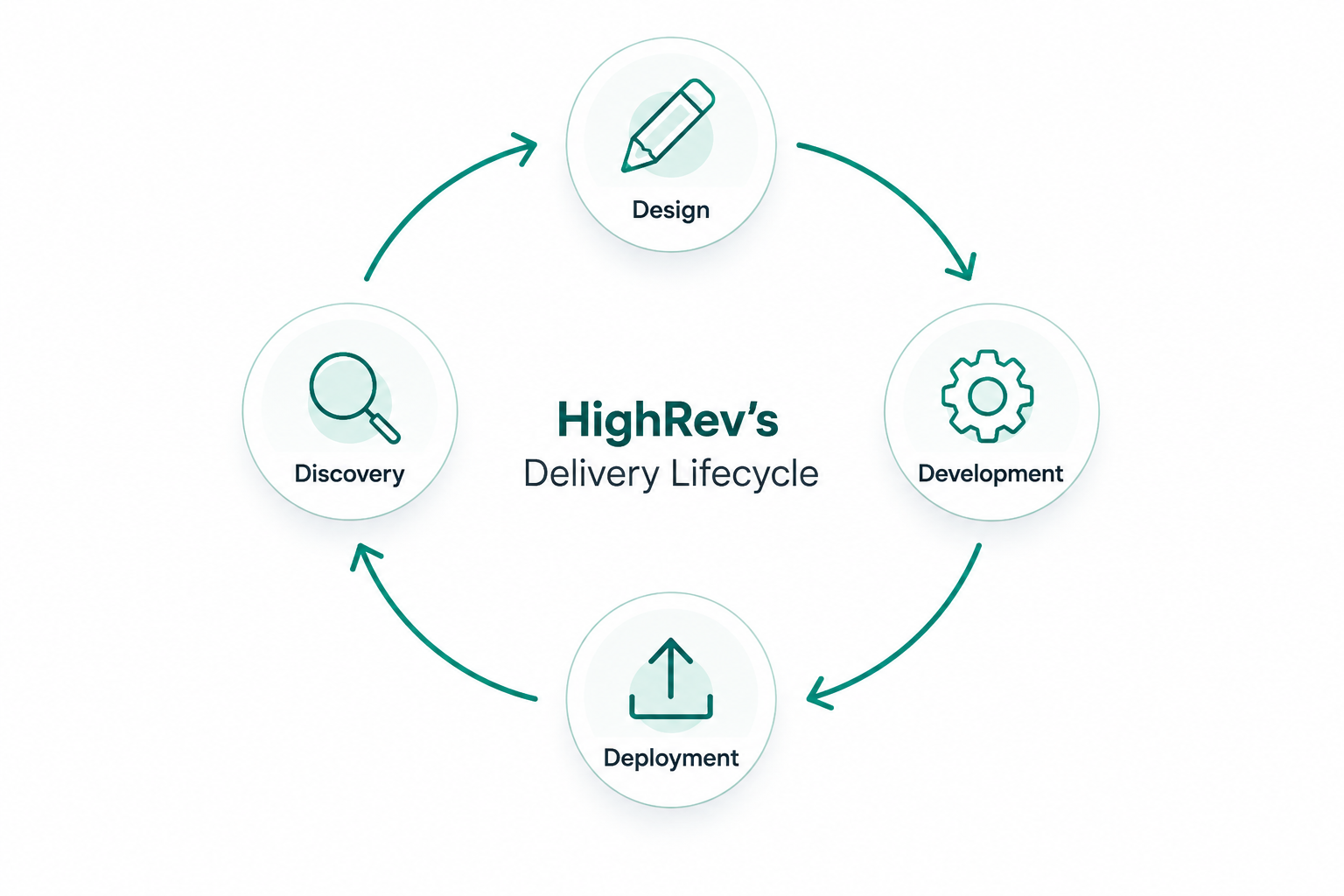
Four Stages of HighRev.ai’s Delivery Lifecycle
HighRev.ai extends beyond documentation by supporting the broader Salesforce delivery lifecycle. Instead of treating documentation as a standalone activity, it connects discovery, design, development, and deployment into a continuous workflow.
Discovery
When a Salesforce org is connected, HighRev.ai automatically generates CRM documentation and analyzes metadata across objects, automations, integrations, and permissions. This enables teams to understand the system architecture and identify technical debt before starting implementation.
Design
Business requirements can be translated into structured delivery artifacts. HighRev.ai converts BRDs into:
- User stories
- Functional requirements
- Architecture designs
This helps teams move from discovery to solution design with clearer documentation and traceability.
Development
AI-assisted development accelerates implementation by generating Salesforce components, including:
- Apex classes
- Flows
- Metadata packages
- Lightning Web Components
This reduces manual development effort while aligning implementation with documented requirements.
Deployment
Once development artifacts are generated, HighRev.ai prepares deployment-ready packages that can be pushed directly into Salesforce using the Salesforce Metadata API.
By connecting documentation, requirements, development, and deployment, HighRev.ai supports a more streamlined delivery workflow across Salesforce projects.
Before choosing a documentation platform, it is useful to understand how HighRev.ai compares with existing tools commonly used in the Salesforce ecosystem.
HighRev.ai vs Elements.cloud
Elements.cloud primarily focuses on documentation and requirements management. HighRev.ai extends this further by automating documentation and supporting downstream stages of the Salesforce delivery lifecycle, from discovery through deployment.
Getting Started with HighRev.ai
Salesforce documentation needs to evolve as Salesforce environments grow more complex. Manual documentation struggles to keep up with continuous changes in automations, integrations, and custom development.
Salesforce document automation enables teams to move from static documentation to continuously updated system visibility.
- Static → Automated: Documentation is generated directly from Salesforce metadata.
- Manual → Intelligent: AI interprets relationships between objects, automations, and integrations.
- Disconnected → Lifecycle-driven: Documentation supports discovery, architecture planning, development, and deployment.
HighRev.ai applies this approach by automatically generating Salesforce documentation and using it as the foundation for the delivery lifecycle.
To see how HighRev.ai generates automated Salesforce documentation and helps teams understand complex CRM environments faster, sign up today!
FAQs
1. How does Salesforce document automation handle metadata?
Salesforce document automation tools analyze metadata directly from the Salesforce org, including objects, fields, flows, validation rules, Apex classes, and relationships between components. By reading metadata through Salesforce APIs, these tools generate structured documentation that reflects the system’s current configuration.
2. What are the limitations of current Salesforce document automation tools?
Many Salesforce document automation tools focus on exporting metadata or generating architecture diagrams. In complex environments with multiple automations and integrations, teams may still need manual analysis to fully understand dependencies and system behavior.
3. Can Salesforce document automation tools integrate with existing CRM systems?
Yes. Most Salesforce document automation tools connect to the Salesforce org through platform APIs. Once connected, they analyze metadata and configuration layers to generate documentation of the CRM architecture and, in some cases, map external integrations.
4. How can teams transition from manual documentation to Salesforce document automation?
Teams typically begin by connecting a Salesforce document automation tool to their existing org. The platform analyzes metadata and generates initial documentation, which can then replace manually maintained spreadsheets or documentation pages.
5. How secure is Salesforce document automation?
Salesforce document automation tools usually access metadata rather than sensitive business data. They rely on secure authentication methods such as OAuth and Salesforce API permissions to ensure controlled and compliant access to system configuration.




