
Salesforce is one of the most widely used CRM platforms in the world, helping organizations manage customer relationships, streamline sales operations, and gain better visibility into revenue performance.
However, adopting Salesforce is not just about purchasing licenses or setting up accounts. The real value comes from how well the platform is implemented across teams, processes, and systems.
A successful Salesforce CRM implementation requires careful planning, clear business requirements, the right data strategy, and alignment between stakeholders across sales, marketing, service, and operations. Without a structured approach, many organizations struggle with adoption challenges, fragmented workflows, and underutilized features.
In this guide, we’ll walk through the Salesforce CRM implementation process step by step. From defining business goals and choosing the right Salesforce cloud to planning data migration and ensuring user adoption, this article covers the key stages organizations should consider when implementing Salesforce successfully.
What is Salesforce CRM Implementation?
Salesforce CRM implementation is the process of configuring and deploying the Salesforce platform to support an organization’s sales, marketing, service, and revenue operations. It involves setting up the system to match how teams manage customer relationships, track opportunities, handle support cases, and report on business performance.
Implementation goes beyond simply creating user accounts or activating features. It requires aligning Salesforce with the organization’s business processes, data structure, and operational goals so teams can use the platform effectively in their day-to-day work.
A typical Salesforce CRM implementation includes several key activities, such as:
- Defining business requirements and success metrics
- Choosing the right Salesforce cloud and edition
- Configuring objects, fields, and workflows
- Migrating data from legacy systems or spreadsheets
- Integrating Salesforce with other business tools
- Setting up automation, dashboards, and reporting
- Training teams and driving user adoption
When implemented correctly, Salesforce becomes a central system for managing customer data and business operations, helping teams streamline workflows, improve collaboration, and gain better visibility into revenue performance.
Salesforce CRM Implementation: Step-by-Step Guide
Users often describe Salesforce as powerful but complex, with a steep learning curve that can make implementation and adoption challenging without the right planning.
In fact, over 1,784 reviewers on G2 cite Salesforce’s learning curve as one of its key limitations. In many enterprise environments, however, that complexity is less about the platform itself and more about how it was implemented.
If you’re wondering how to plan a successful Salesforce CRM implementation, the process starts with clearly defining a few foundational elements before moving into technical discovery, audits, and solution design.
The table below outlines the key factors organizations should define early to set the foundation for a successful implementation.
(Auditing existing processes at this stage is critical to ensure the new system aligns with established workflows and identifies areas for improvement.)
Define Business Goals and Implementation Scope
The first step in any Salesforce CRM implementation is defining what the organization wants to achieve with the platform. Without clear business goals, it becomes difficult to configure Salesforce in a way that actually supports operations.
At this stage, stakeholders across sales, marketing, customer service, and revenue operations typically align on:
- Key business objectives
- Processes that need improvement or automation
- Success metrics for the implementation
- Departments that will initially adopt Salesforce
This phase also includes reviewing existing workflows to understand what is currently working and where operational inefficiencies exist.
Map Business Requirements to Salesforce Capabilities
Once business goals are clear, the next step is translating those requirements into Salesforce functionality.
Organizations evaluate how their operational needs align with Salesforce features and decide which products or modules best support those workflows. This is where teams determine whether they need solutions such as Sales Cloud for pipeline management, Service Cloud for customer support, or other Salesforce products.
At this stage, teams typically document key processes, integration points, compliance requirements, and the metrics they want Salesforce to track. Doing this early helps ensure that the system is configured around real operational needs rather than assumptions.
In fact, organizations that document these elements before configuration often reduce mid-project changes and rework, saving 20–30% in overall implementation costs.
Mapping requirements early ensures that Salesforce is configured to support real business processes rather than forcing teams to adapt to poorly designed workflows.
Choose the Right Salesforce Cloud and Edition
Salesforce offers multiple products and editions designed for different use cases and company sizes. Selecting the right combination is critical for both functionality and cost efficiency.
For example:
- Sales teams may adopt Sales Cloud for lead and opportunity management
- Customer service teams may require Service Cloud for case management and support workflows
- Marketing teams may use Marketing Cloud to manage campaigns and customer journeys
Organizations also need to choose the appropriate edition (Professional, Enterprise, or Unlimited) depending on customization needs, automation requirements, and user scale.
Assemble the Implementation Team
A successful implementation requires collaboration between business stakeholders, technical experts, and leadership.
Typical implementation teams include:
- Salesforce administrators or architects
- Department leaders from sales, marketing, or service
- IT and integration specialists
- Implementation partners or consultants
Clearly defining roles and responsibilities early helps prevent delays and ensures that decisions are made efficiently throughout the project.
Audit Existing Processes and Plan Data Migration
Before migrating to Salesforce, organizations must evaluate their existing systems and data sources. Many companies rely on spreadsheets, legacy CRMs, or disconnected tools that store customer data.
During this stage, teams typically:
- Audit current sales and service workflows
- Identify which data needs to be migrated
- Clean and standardize data before transfer
- Define how records will be structured in Salesforce
Proper data planning prevents duplication issues and ensures teams start with accurate, usable information inside the new system.
Configure Salesforce to Match Business Workflows
After discovery and solution design are complete, the implementation moves into development and configuration. In enterprise environments, this phase typically follows Agile delivery practices, where the overall scope is broken down into user stories with clearly defined acceptance criteria.
Each user story is supported by a low-level design (LLD) document that outlines the required objects, fields, automation logic, integrations, security considerations, and expected business outcomes. Developers and administrators then configure Salesforce using standard features such as objects, validation rules, flows, approval processes, and reports, while extending functionality through Apex code when business requirements cannot be met through declarative tools alone.
Configurations are built, tested, and deployed iteratively across development, sandbox, and production environments. Throughout the process, business stakeholders validate each user story against its acceptance criteria to ensure the implementation aligns with operational needs.
Organizations also customize dashboards, reporting structures, and permission models so every department has the visibility and access controls required for their roles. The objective is not to force teams to adapt to Salesforce, but to configure Salesforce around existing business processes while maintaining a scalable and supportable architecture.
Integrate Salesforce with Existing Systems
Most organizations rely on multiple tools for marketing, finance, customer support, and analytics. Integrating these systems with Salesforce helps create a unified view of customer data.
Common integrations include:
- Marketing automation platforms
- Customer support tools
- ERP and billing systems
- Communication tools like email and chat platforms
These integrations allow information to flow across systems and reduce the need for manual data entry.
Train Teams and Drive User Adoption
Even the most technically sound implementation can fail if teams do not adopt the system. Training and change management are critical parts of the process.
Organizations usually focus on:
- Role-based training for different departments
- Clear documentation and onboarding resources
- Internal champions who help teams adopt the platform
The goal is to ensure employees understand how Salesforce supports their work and feel comfortable using it daily.
Test, Launch, and Optimize the System
Before the final rollout, teams typically run testing phases to ensure configurations, integrations, and workflows function as expected.
Once testing is complete, the organization can move into the production launch. After go-live, teams monitor adoption, gather feedback, and continue optimizing the system as business needs evolve.
Salesforce implementations are rarely static. They improve over time as organizations refine processes and expand how the platform is used.
Post-Go-Live Optimization For Salesforce CRM Implementation
Launching Salesforce is the beginning of continuous improvement. Once the system goes live, organizations often discover new requirements, process gaps, and opportunities to improve how teams use the platform.
Post-go-live optimization focuses on refining configurations, improving user adoption, and ensuring the platform continues to support evolving business needs. Without this phase, many organizations risk underutilizing Salesforce or reverting to manual processes and external tools.
Monitor User Adoption and Usage
One of the first priorities after launch is understanding how teams are actually using the system. Tracking login activity, record updates, dashboard usage, and workflow engagement helps identify whether employees are fully adopting the platform.
If certain features or workflows are not being used as expected, organizations can provide additional training, simplify processes, or adjust configurations to make the system easier to use.
Refine Workflows and Automations
Initial implementations often focus on getting the system operational. After teams begin using Salesforce in real scenarios, opportunities for improving workflows and automations become more visible.
Organizations may refine approval processes, optimize lead routing, simplify case management workflows, or introduce additional automation to eliminate repetitive tasks. These adjustments help increase efficiency and reduce manual work across departments.
Improve Reporting and Executive Visibility
Once data starts flowing into Salesforce consistently, teams can enhance dashboards and reports to provide better insights into performance.
Revenue leaders often refine pipeline reports, sales forecasting dashboards, and service performance metrics to improve decision-making. Over time, more advanced reporting and analytics can be introduced to support strategic planning.
Address Data Quality and Governance
Maintaining clean and reliable data is critical for long-term CRM success. After go-live, organizations should establish data governance practices such as:
- Standardizing data entry rules
- Monitoring duplicate records
- Defining data ownership across teams
- Creating validation rules to maintain consistency
Strong data governance ensures Salesforce remains a trusted source of information for sales, marketing, and service teams.
Expand Integrations and Capabilities
Many organizations start with a limited set of integrations during the initial implementation. Post-go-live optimization provides an opportunity to connect additional tools and systems to Salesforce.
This may include marketing automation platforms, customer support tools, billing systems, or analytics platforms. Expanding integrations gradually helps create a more connected technology ecosystem without overwhelming teams during the initial rollout.
Gather Feedback and Plan Future Enhancements
Finally, organizations should continuously gather feedback from the teams using Salesforce daily. Sales representatives, support agents, and operations teams often identify usability improvements or new automation opportunities that were not visible during the initial implementation.
Regular feedback loops and periodic system reviews allow organizations to prioritize enhancements and ensure Salesforce continues to evolve alongside business processes.
A successful Salesforce implementation is not defined by the launch date alone. Continuous optimization ensures the platform delivers long-term value by adapting to changing operational needs and helping teams work more efficiently.
Major Challenges In Salesforce CRM Implementation
Salesforce CRM implementation can deliver significant operational value, but many organizations encounter challenges during planning, deployment, and adoption. These issues often arise when business requirements, technical design, and user readiness are not fully aligned.
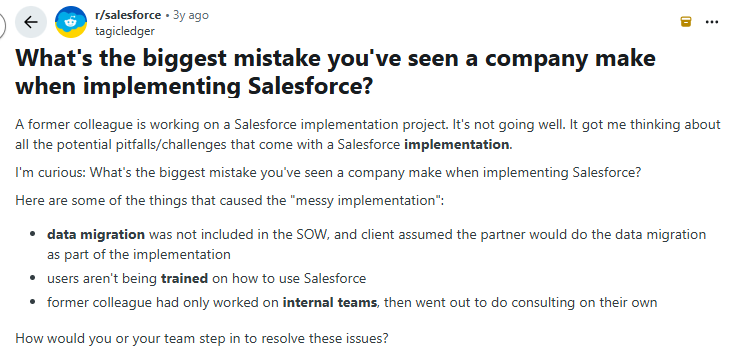
Starting with the highlighted challenges in the screenshot, here are major Salesforce CRM implementation challenges users face and how to solve them.
1. Data Migration Issues
Incomplete data audits and unclear field mapping often lead to inaccurate reporting, duplicate records, and broken automation once the system goes live.
Start by auditing source data to identify ownership gaps, duplicates, formatting inconsistencies, and missing records. Define clear field-mapping rules aligned with the approved Salesforce data model. Test migrations in a sandbox environment to validate data relationships and record accuracy, and obtain business sign-off before moving data into production.
2. Customization Complexity
Excessive or poorly documented customization can increase maintenance effort and make future changes more difficult and expensive.
Establish clear standards for data models, automation rules, and configurations during the design phase. Prioritize standard Salesforce features before introducing custom code. Document all objects, workflows, integrations, and security changes so future administrators and teams can maintain the system effectively.
3. Integration Challenges
Unclear integration scope or poorly defined data flows can cause API errors, synchronization failures, and instability once Salesforce is connected to other business systems.
Identify all external systems and required data flows early in the discovery phase. Define integration architecture, ownership of data sources, and synchronization logic during design. Before go-live, conduct end-to-end testing of API calls, error handling mechanisms, and reconciliation processes.
4. Scalability Constraints
A system designed only for current data volumes and workflow requirements may struggle as the organization grows, leading to performance issues under higher automation loads or increased API usage.
Forecast expected data growth and transaction volume during the discovery stage. Design efficient data models and automation processes that can handle future expansion. Running performance and load testing before deployment helps identify potential bottlenecks early.
5. User Training and Adoption Gaps
Generic training programs often lead to low platform adoption, inconsistent data entry, and limited return on investment from the implementation.
Provide role-based training tailored to the workflows each team will use in Salesforce. Update internal SOPs, assign internal champions to support adoption, and track usage metrics to measure engagement and identify areas where additional training may be needed.
Do You Need A Salesforce Implementation Partner?
To help you decide whether you need a Salesforce CRM implementation partner, it helps to review the three common delivery models and assess which aligns with your internal capability, timeline, risk tolerance, and budget.
Before choosing a model, many organizations evaluate a few practical factors. For example, bringing in a Salesforce implementation partner is often necessary when:
- There is no in-house Salesforce team to manage configuration and deployment
- The internal team does not have deep Salesforce implementation experience
- The project involves a large rollout, multiple departments, or complex integrations
- Internal teams lack the bandwidth or resources to manage the implementation alongside daily operations
- The organization wants to reduce risk and avoid costly rework during deployment
The table below compares the three common delivery approaches organizations use.
Organizations typically choose between these models based on factors such as integration complexity, data migration scope, internal expertise, long-term growth plans, and how much implementation risk they are willing to absorb.
How Salesforce CRM Implementation Partners Can Help
Salesforce CRM implementation can become complex as organizations scale across teams, systems, and data sources. While smaller deployments may be managed internally, many companies rely on Salesforce implementation partners to guide planning, configuration, and long-term optimization.
Implementation partners bring specialized expertise, structured processes, and technical experience that help organizations deploy Salesforce more efficiently while reducing the risk of costly errors or rework.
Here are some of the key ways Salesforce CRM implementation partners support organizations during the implementation lifecycle.
Implementation Planning and Solution Design
One of the most valuable contributions of a Salesforce implementation partner happens before any configuration begins. Beyond technical expertise, partners bring together specialists across multiple disciplines, including business analysts, solution architects, technical architects, developers, QA engineers, integration specialists, and data migration experts.
Business analysts translate business goals into detailed requirements and user stories, while architects design scalable data models, security frameworks, and integration patterns. Integration experts define how Salesforce connects with ERP, marketing, support, and finance systems, and migration specialists ensure legacy data is cleaned, mapped, and validated before moving into production.
This collaborative approach helps organizations define implementation scope, map business requirements to Salesforce capabilities, identify dependencies, and create a delivery roadmap grounded in actual business workflows rather than assumptions.
Configuration and Customization
Salesforce offers extensive flexibility, but configuring the platform correctly requires coordinated expertise across multiple roles. Implementation partners combine administrators, developers, architects, testers, and integration specialists to ensure the system is both functional and maintainable.
Business analysts work with stakeholders to refine user stories and acceptance criteria, technical architects govern design decisions and platform standards, and developers build configurations, flows, Apex code, and integrations. QA teams validate functionality through structured testing cycles, while migration and integration specialists ensure external systems and historical data operate seamlessly within the new environment.
Implementation partners also configure objects, automation, security settings, dashboards, and reporting structures so Salesforce reflects how teams manage leads, opportunities, cases, and customer interactions. Following established best practices at every stage reduces technical debt and makes future enhancements easier to implement and support.
Data Migration and System Integration
Migrating data from legacy systems or disconnected tools is often one of the most challenging parts of implementation. Implementation partners help audit existing data, define migration strategies, clean records, and test migrations to ensure accuracy.
They also design and implement integrations between Salesforce and other business systems such as marketing automation platforms, ERP tools, support platforms, and communication systems. This helps create a unified flow of customer data across the organization.
User Training and Change Management
Even a technically sound implementation can fail if employees do not adopt the system. Implementation partners often support onboarding and change management efforts to help teams transition smoothly to the new platform.
This may include role-based training, documentation, workflow walkthroughs, and guidance on how teams should incorporate Salesforce into their daily operations.
Ongoing Optimization and Support
Salesforce implementations rarely remain static. As organizations grow, their processes evolve and new requirements emerge.
Many implementation partners continue supporting organizations after launch by optimizing workflows, improving reporting, introducing additional automation, and expanding integrations. This ongoing support helps ensure that Salesforce continues to deliver value as the business scales.
Conclusion
Organizations that approach implementation with a clear plan, structured processes, and strong internal alignment are far more likely to see long-term value from the platform. That includes documenting current systems, auditing workflows, and ensuring the solution is designed to scale as teams, data volumes, and operational needs grow.
However, maintaining that clarity becomes increasingly difficult as Salesforce environments evolve. Over time, organizations add new automations, integrations, fields, and workflows, which can make it harder to understand how the system actually works or where issues originate.
This is where platforms like Highrev.ai can provide significant value. Highrev.ai’s AI-powered agents help teams quickly document their Salesforce org, audit existing architecture, detect system issues, and design future improvements.
Instead of manually reviewing metadata, flows, or integrations, teams can gain a clear view of how their Salesforce environment is structured and where optimization opportunities exist.
For organizations planning a new implementation or managing an existing Salesforce environment, having this level of system intelligence and visibility makes it much easier to diagnose problems, plan enhancements, and maintain a scalable architecture.
If you want to understand your Salesforce environment faster and plan improvements with greater confidence, you can try Highrev.ai to generate a real-time blueprint of your Salesforce org and uncover opportunities to optimize your CRM architecture.
FAQs
1) What Is Salesforce CRM Implementation?
Salesforce CRM implementation is the end-to-end process of planning, configuring, customizing, integrating, and deploying Salesforce through structured Discovery, Design, and Development phases to support defined business outcomes.
2) How long does Salesforce CRM Implementation take?
Timelines range from weeks to months depending on scope, integrations, data migration, and customization complexity, with strong Discovery and Design discipline reducing rework and shortening delivery cycles.
3) What are the main phases of Salesforce CRM Implementation?
The main phases are Discovery, Design, Development, deployment, and optimization, each producing structured outputs required for the next stage.
4) What are the biggest challenges In Salesforce CRM Implementation?
Key challenges include data migration errors, over-customization, integration failures, scalability limits, and low user adoption, often caused by weak lifecycle control.
5) Do I need a Salesforce Implementation partner?
You need a partner when complexity, integration scope, or limited internal expertise increases delivery risk beyond what your team can manage.
6) What Is the role of data migration?
Data migration ensures clean, mapped, and validated legacy data is transferred into Salesforce in alignment with the approved data model before go-live.
7) How do I ensure user adoption?
Ensure adoption by aligning workflows during Discovery, validating usability in Design, delivering role-based training, and tracking post-launch usage metrics.
8) How do I choose the right Salesforce edition?
Choose the edition based on required clouds, automation needs, integration limits, data volume, compliance requirements, and projected growth.




