In many Salesforce implementations, the hardest work happens before anyone builds anything.
A delivery lead joins a kickoff for a new enterprise engagement. The client has run Salesforce for years across multiple clouds, cycled through partners, and has limited documentation. The org has hundreds of custom fields with unclear usage, flows layered on older flows, Apex triggers no one can confidently explain, and legacy automation people avoid touching.
The first weeks of the project are spent on the same task every time: figuring out what actually exists in the org.
That is the day-to-day reality for Salesforce SI teams working in brownfield environments. Yet most content on “Salesforce automated process” focuses only on what teams build inside a client org. It rarely addresses how delivery teams can automate the implementation work itself, especially discovery, org analysis, and the translation of requirements into build-ready scope.
When SI teams talk about a Salesforce automated process, they usually refer to two different automation layers.
Understanding the distinction helps delivery teams scope projects correctly and avoid architecture mistakes.
Both layers matter in real-world implementations:
- Instance automation determines how business processes run inside Salesforce.
- Delivery automation determines how quickly and accurately those processes can be designed, implemented, and maintained.
Top Salesforce Integration (SI) partners operate at both levels. This guide covers both, with a focus on delivery impact that most miss.
Salesforce Automated Process Definition
A Salesforce automated process is rules-driven logic that executes without human intervention when a defined trigger condition is met. The trigger can be a data event (a record is created or updated), a schedule (run every Monday at 8am), or an external signal (a platform event fires from an integrated system).
When triggered, the process executes one or more actions: updating a field, creating a child record, sending a notification, calling an external API, or spawning a multi-step orchestration.
The goal is always the same: remove manual steps, enforce consistency, and let people focus on work that requires judgment rather than repetition.
Once you know what an automated process is, the next delivery-critical detail is the execution context it runs under. That user context determines what the automation can access, what it can call, and why “it worked in testing” sometimes fails in production.
Automated Process User Vs Default Workflow User
Salesforce background automation runs under a specific execution context. In logs and error messages, that context often appears as the Automated Process User.
This matters because the Automated Process User is not a normal user. Some actions can fail due to permission and capability constraints. A common example is ConnectApi (Connect in Apex) failing with insufficient privileges when invoked from automation contexts.
For scheduled automation, Salesforce gives you a more controllable option: the Default Workflow User in Process Automation Settings. When it’s configured, schedule-triggered flows run as that user rather than the Automated Process User, which makes permissions predictable and governance easier.
Pro tip: During discovery, confirm the Default Workflow User is set and has the permissions your scheduled automation will require. This is a fast setup step that prevents a predictable class of post go-live failures.
Automation Layer 1: Salesforce Instance Automation
When designing Salesforce instance automation, choosing the right tool for each requirement is as important as the build itself. Use the wrong tool and you create technical debt. Skip documentation and you hand the next delivery team a mystery.
Salesforce Flow
Flow Builder is the primary automation tool in Salesforce today. Flows can run in user context or system context depending on configuration, which is why execution context belongs in your design and test plan from day one.
Salesforce has consolidated all new automation onto Flow by disabling legacy tool creation:
- Starting Winter '23, you can no longer create new Workflow Rules
- Starting Summer '23, you can no longer create new Process Builder processes
The four Flow types delivery teams work with most:
Approval Processes
Approval processes handle structured, multi-step approval chains with assigned approvers and conditional routing logic: quote approvals, discount authorization, contract sign-off, and any workflow where a record must pass through defined human checkpoints before progressing.
Salesforce firms often carry multiple overlapping approval processes on the same object, built across different projects with different entry criteria and escalation paths. Audit these before scoping any new approval automation.
Orchestration and Platform Events
Both tools sit at the complex end of the automation spectrum and appear more frequently in enterprise SI engagements.
Flow Orchestration is designed for multi-stage processes that interact with multiple users and systems across extended timeframes. One runtime detail that matters in delivery: for API version 60.0 and later, a record-triggered orchestration always launches and resumes in the context of the Automated Process User in system context. Factor this into your permission and governance design before build begins.
Platform Events enable event-driven architecture and real-time integration between Salesforce and external systems using a publish-subscribe model. This is the right tool when Salesforce needs to communicate with ERP systems, billing platforms, or data warehouses without building brittle point-to-point automation.
Apex
Apex handles what declarative tools cannot: bulk data processing, complex conditional logic, integrations requiring precise error handling, and operations needing tight transactional control.
The delivery principle:
- Build in Flow first
- Reach for Apex only when Flow hits a hard limit
- Document why Apex was chosen, every time
Undocumented Apex inherited in a brownfield org requires developer expertise to maintain, cannot be handed to a client admin, and becomes increasingly fragile as the org evolves around it.
Legacy Tools
Workflow Rules and Process Builder still exist in many client orgs. You can activate, deactivate, and edit existing processes, but you can no longer create new ones. Salesforce ended support and updates for both tools as of December 31, 2025, and recommends migrating all automation to Flow.
For clients carrying significant legacy automation, migration to Flow should be scoped as a named workstream with its own timeline and resources — not absorbed into another project phase. Unplanned migration is one of the most predictable sources of scope creep in brownfield engagements.
Where Salesforce Process Automation Delivers The Most Value
For SI partners, understanding where automation creates the most business value shapes what gets scoped, what gets recommended first, and what positions the partner as a strategic advisor rather than a configurator.
Sales Operations
Sales teams generate the highest volume of repetitive, rules-based activity in most Salesforce orgs, making them the most natural starting point for automation.
Service Operations
Service orgs run on speed and consistency. Automation here directly impacts resolution times, SLA compliance, and agent capacity — metrics that clients measure and remember.
Case assignment and escalation are the most common service automation requests in SI project scopes. A well-built record-triggered flow that routes incoming cases by product, priority, and available agent capacity removes a category of manual triage work entirely.
SLA monitoring via schedule-triggered flows checks open cases against breach thresholds at defined intervals and fires escalation alerts before a breach occurs rather than after. This is a meaningful operational shift for service teams running high case volumes.
What delivery teams frequently underestimate: Brownfield service orgs accumulate case automation across years and multiple partners. Escalation flows, assignment rules, entitlement processes, and Apex triggers often overlap in ways that produce inconsistent behavior. Auditing the existing service automation before scoping new builds is where discovery effort pays back the most in this domain.
Revenue Operations
Revenue operations automation tends to be the most complex to scope and the highest value to deliver correctly.
- Contract lifecycle automation: Renewal reminders, expiry triggers, and amendment workflows built on schedule-triggered flows and platform events keep revenue-critical processes running without manual intervention
- Multi-cloud handoffs: Closed-won opportunities in Sales Cloud triggering provisioning workflows in Revenue Cloud or billing events in an external system are among the most technically demanding automations SI partners build, and among the most visible to the client's finance team when they break
- CPQ and pricing logic: Approval chains tied to discount thresholds, margin floors, and product configuration rules require careful design to avoid approval bottlenecks that slow deal velocity
Automation Layer 2: Salesforce Delivery Automation
Every section above describes automation that SI partners build for clients. The use case that rarely appears in articles like this one is the automation of how partners deliver those implementations.
Discovery, org analysis, solution design, user story generation, and development planning are the stages where delivery effort accumulates, timelines slip, and margin erodes. They are also, largely, still manual at most SI firms, dependent on individual architects, tribal knowledge, and document templates that vary by project and team.
The most forward-thinking SI partners are applying the same automation logic to their own operations:
- Pre-Sales: Automated org analysis before an RFP response gives pre-sales teams data-backed complexity assessments instead of assumption-based estimates. Partners who can walk into a proposal conversation having already scanned the prospect's org win on credibility before the first slide is shown.
Must Read: If your discovery still runs on interviews and spreadsheets: See what automated Salesforce delivery looks like in practice.
- Discovery: Replacing multi-week manual org reviews with automated org mapping, surfacing every object, field, flow, trigger, validation rule, and installed package in minutes, compresses the most time-consuming phase of delivery without reducing its quality.
- Solution Design: Converting business requirements into implementation-ready solution designs without starting from a blank document on every project. When the AI agent understands both the requirement and the org it is being built for, the output is context-aware rather than generic.
- Development Planning: Turning approved designs into sprint-ready work items with effort estimates, dependencies, and risk flags removes the manual translation layer between architecture and development that is responsible for a significant share of delivery rework.
- Managed Services: Continuous monitoring across client orgs with proactive alerting means delivery teams identify and resolve issues before clients report them, a direct driver of client retention and expansion revenue.
Benefits of Salesforce Process Automation for SI Partners
The benefits of Salesforce process automation read differently depending on whose P&L you are managing. For end customers, the win is operational efficiency. For SI partners, the wins are margin, velocity, and the ability to scale without hiring a senior architect for every new engagement.
Shorter Timelines, Faster Revenue Recognition
For SI partners running fixed-fee engagements, every week saved in the pre-build phase is a week of delivery cost eliminated before a single flow is written. Automating discovery and solution design compresses the time from project kickoff to development-ready specs, the phase where most timeline slippage originates.
Where partners lose time today:
- Manual org analysis that takes weeks instead of hours
- Solution design starting from a blank document on every project
- Back-and-forth between architects and BAs to align requirements with org reality
- Development planning done manually after design is approved
SI partners using AI-powered delivery platforms like HighRev.ai that connect org intelligence directly to solution design are reporting up to 60% faster turnaround from requirement to implementation-ready plan.
Rework Goes Down When Context Stays Intact
Rework does not start in development. It starts in the gap between discovery and design, where requirements lose their connection to org reality, and widens at every subsequent handoff. Partners that keep project context intact, with requirements tied to org structure and designs traceable to business outcomes, eliminate the primary rework trigger before it reaches a sprint.
HighRev.ai's org-aware agents maintain that context across the full delivery lifecycle. Every solution design generated is built against the actual metadata of the connected org, not a generic Salesforce best practice template, which means what gets designed is buildable from day one.
Scalability Without Proportional Hiring
The growth constraint for most SI firms is not talent availability. It is the ability to deploy senior architect-level thinking consistently across multiple concurrent projects. Delivery automation encodes that expertise into repeatable processes that junior team members can execute to a senior standard, without the senior architect being present at every stage of every engagement.
Estimates that Hold at Project Close
The margin erosion on fixed-fee projects almost always traces back to one moment: a scoping decision made during pre-sales without full org visibility. What gets missed during discovery shows up as unplanned work mid-sprint, absorbed silently into delivery cost.
Client Retention Built on Proactive Delivery
In managed services, the partners with the highest retention rates are not the ones who fix problems fastest. They are the ones clients never have to call. Continuous org monitoring with proactive alerting shifts the partner relationship from reactive vendor to trusted operator, and that shift shows up directly in renewal and expansion revenue.
HighRev.ai's monitoring capability tracks every client org continuously, surfacing automation failures, data anomalies, and system errors before they become client-reported incidents. For partners offering managed services, this is the difference between a client that renews and one that does not.
What to Automate First
Most SI partners know they should be automating more of their delivery process. The question is where to start without disrupting active projects or creating more complexity than the automation removes.
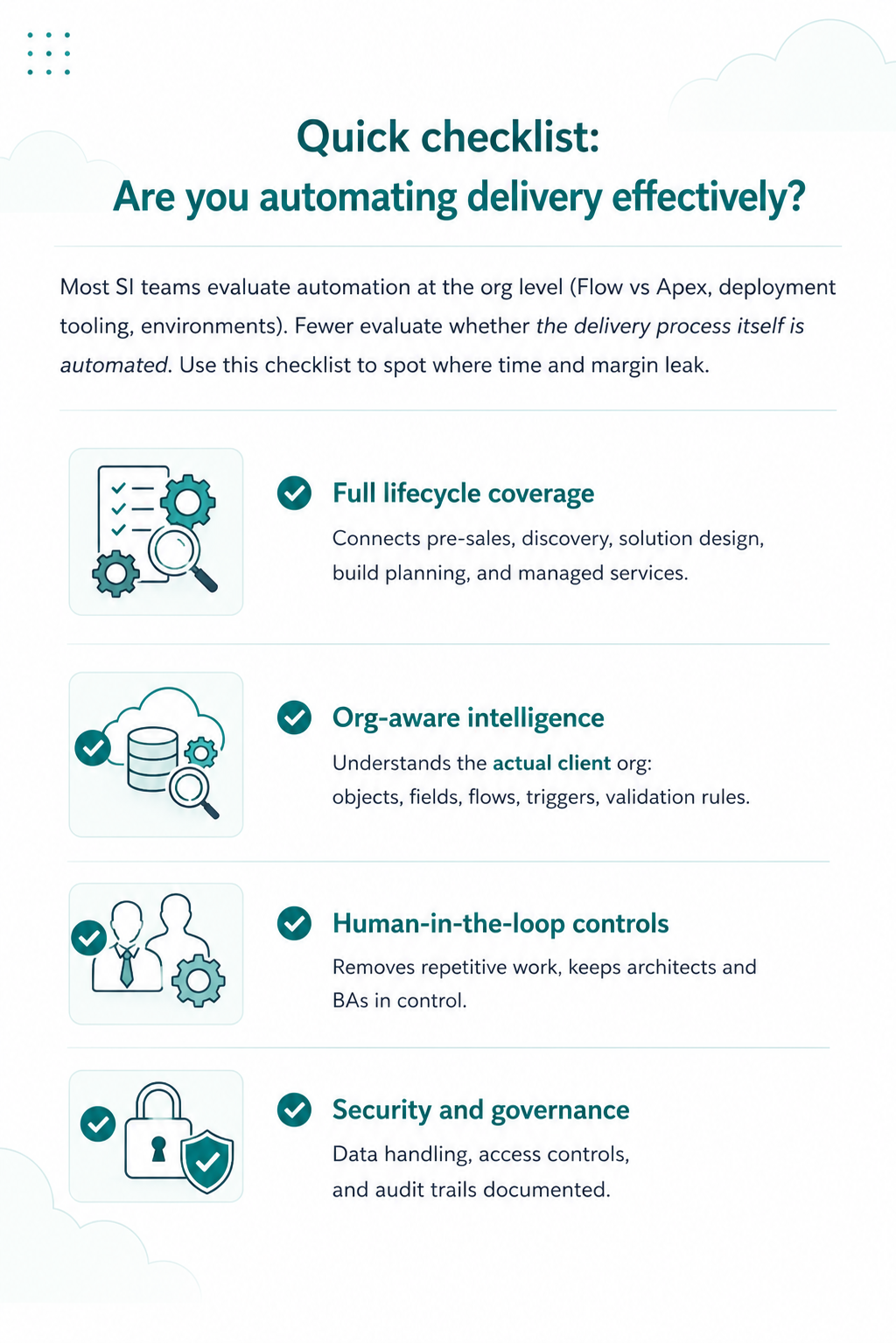
The answer is sequencing by impact and risk, not by ambition. The highest-return automated workflows are almost always the ones replacing high-volume manual tasks where human error is most likely: lead routing, case assignment, field updates, renewal reminders. These are the repetitive tasks that consume delivery capacity and introduce inconsistency every time a human executes them manually.
When it comes to Salesforce instance automation, sales platform implementations specifically, automated workflows around opportunity stage actions, quote approvals, and closed-won handoffs, deliver the fastest visible ROI for clients and the clearest proof of delivery quality for partners. These are also the processes where manual tasks and human error carry the highest commercial cost: a missed follow-up, a delayed approval, and a handoff that falls through the gap between sales and delivery.
For Salesforce delivery automation, the starting point is simpler: audit before you build anything else. A complete picture of what is already running in a client org is the foundation every other delivery decision depends on. Without it, every estimate is an assumption, every build carries undiscovered risk, and data security considerations around existing permission models and sharing rules go unexamined until they surface as post-launch incidents.
Before your next project kicks off: Run a full org audit with HighRev.ai's Org Intelligence Agent and get a complete org map, including data security configurations, permission models, and all active automation, in under 15 minutes.
Book a demo today!
FAQs
Q1: What is the Salesforce Automated Process User?
The Automated Process User is the system identity Salesforce uses to run certain background automation. Delivery teams usually notice it in debug logs and error messages when automation runs outside a human user session.
Why it matters: automation that runs under this context can behave differently than automation running as a named user, especially around permissions, API access, and “it worked in sandbox” failures. For scheduled automation, many teams prefer using a Default Workflow User (configured in Process Automation Settings) so the running user and permissions are explicit and easier to govern.
Q2: Should new automations still be built in Process Builder?
No. New automation should be built in Flow, not Process Builder.
Salesforce has been moving all net-new automation to Flow and has restricted creation of legacy tools over recent releases. Existing Process Builder processes can still exist in many orgs, but for delivery work, treat them as legacy: keep them stable, document them, and plan migration to Flow based on complexity and risk.
Q3: What’s the difference between Salesforce Flow and Salesforce Orchestration?
Flow automates a defined process: one trigger (or entry point) and a set of actions, often completed quickly.
Flow Orchestration coordinates work across multiple stages, roles, and time. It’s designed for processes with handoffs, approvals, and human tasks that may pause and resume, sometimes with parallel steps.
A good mental model:
- Flow = execute logic
- Orchestration = coordinate work
Q4: How do SI partners use Salesforce process automation to improve delivery margins?
Margins improve when partners reduce effort in the phases that silently consume the most hours:
- Discovery and org analysis (what already exists, what overlaps, what breaks)
- Solution design (turning requirements into buildable designs without rework)
- Planning and handoffs (keeping context intact from architect to build team)
Automating or accelerating these steps reduces hours per project, improves estimate accuracy, and lowers rework, which matters most on fixed-fee engagements.
Q5: What is digital process automation in Salesforce?
Digital process automation (DPA) is the practice of streamlining end-to-end business processes using low-code automation, integrations, and rules-based workflows.
In Salesforce, DPA is typically delivered through:
- Flow Builder (core automation)
- Approval processes and orchestration (multi-step processes with human stages)
- Integration patterns (APIs and event-driven approaches like platform events)
For delivery teams, DPA is not just a client outcome. It also shapes how you scope, test, govern execution context, and document what you inherit in brownfield orgs.




